At the entrance
- Tells entries from exits by itself - no buttons.
- Entry: green light, exit: blue, refused: red. Each with its own sound.
- Two quick taps of the same card count as one.
RAZ-RCP-1 hangs at the entrance. Staff tap a card and the reader works out by itself whether they are coming in or going out, and it can open the door straight away. Hours add up in the panel built into the reader - no subscription.
PLN 799net, one-offPLN 982.77 grossIn stock
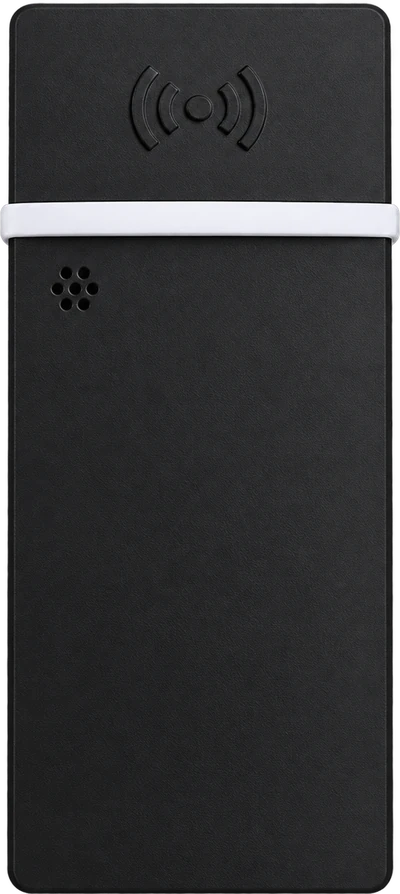
Our earlier devices were called SKRYBA-1. Many of them are still in use, and we still service them.
It runs on USB-C (5 V, 2 A) and the power supply is in the box. No need to hide cables in the wall. Connect the reader by cable, over Wi-Fi or through its own hotspot.
5 cards are in the box. Read a card number by tapping it on the reader, and one person can have several cards or key fobs.
The reader tells entries from exits by itself. Hour totals and days to check are in the panel.
You open it in a browser, on a computer or a phone: through the reader's hotspot and, once you switch it on, on your company network too (HTTPS only). Nothing to install and no subscription.
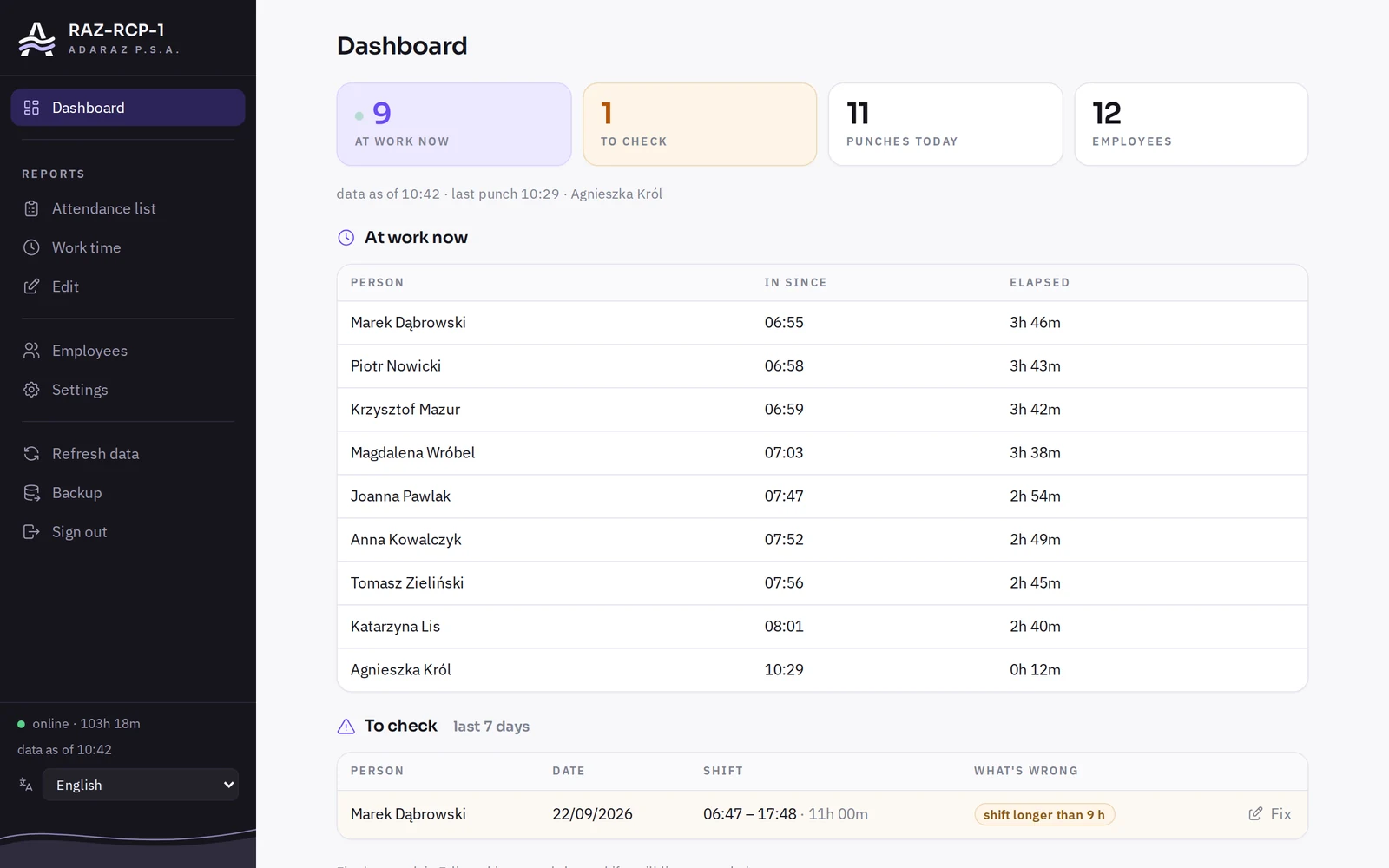
Dashboard. Who is at work right now and since when. The panel flags days to check by itself, e.g. a shift longer than 9 hours.
Screenshots of the real panel with sample data.
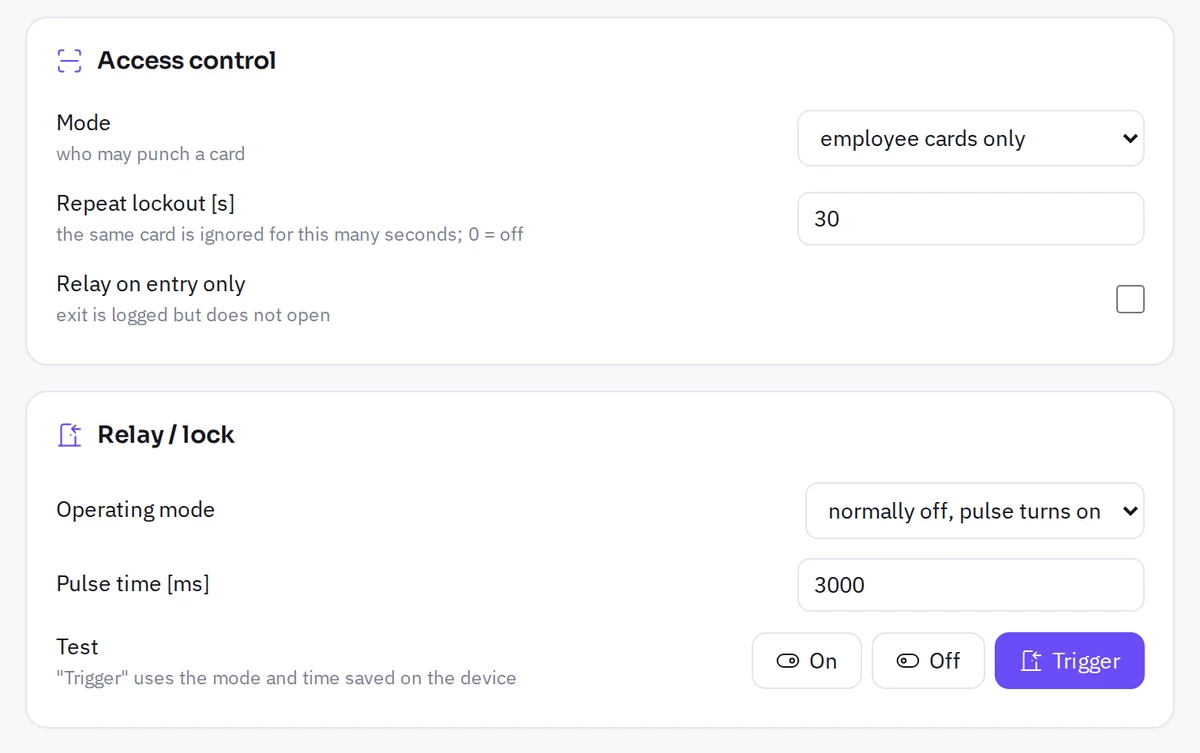
The reader has a built-in relay for a DC electric strike, lock or magnetic lock. Staff tap a card: the reader records the time and opens the door straight away. No separate access controller needed.
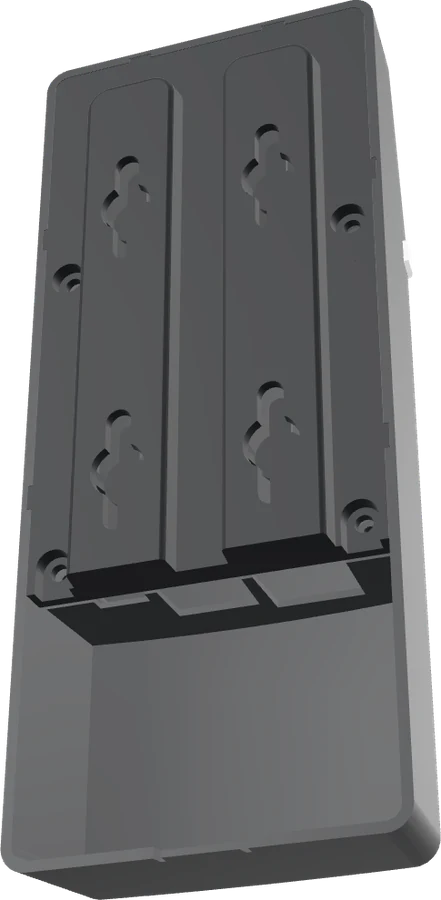
The reader runs on USB-C (5 V, 2 A) and connects over Wi-Fi. A socket nearby is all it takes. If you would rather hide the cables, the spare length fits on a shelf at the back of the housing.
The reader sends punches to your server by itself, for example your HR or ERP system. You enter the address in the reader panel and that is it - no extra software in between.
Each punch is a separate POST request to the address set in the panel, form-encoded. The login and password go in a Basic auth header. A simple server-side script is enough.
Example (http3 format, card number in hex)
POST /rcp HTTP/1.1
Host: kadry.twoja-firma.pl
Authorization: Basic cmNwOmhhc2xv
Content-Type: application/x-www-form-urlencoded
User-Agent: RAZ-RCP/8
rfidID=04a1b2c3d4e5f6×tamp=2026-09-24+08%3A42%3A00&machineId=czytnik-recepcja
HTTP/1.1 200 OK
{"stored":true}rfidID | card number: http3 - lowercase hex (04a1b2c3d4e5f6), http2 - decimal (1303689068602870) |
|---|---|
timestamp | punch time in UTC: YYYY-MM-DD HH:MM:SS |
machineId | reader ID from the panel, by default the name of its hotspot |
| 200 | Accepted. Confirm a punch you already have with 200 too - ideally with {"stored":false} in the body. |
|---|---|
| 400, 404 | Rejected for good, e.g. an unknown card. The reader takes it off the queue, but it stays in its memory and reports. |
| 401, 403 | Wrong login or password. The reader keeps trying. |
| other, no answer | The cycle stops and the reader retries from the same punch: after 30 s, 60 s, 120 s and so on, at most at the set interval. |
Everything on this list works in the reader itself - no cloud, no subscription.
The reader works on its own, on your network. To check in from home or from your phone, connect it to RCP-CLOUD: take a code in the cloud and type it into the reader panel. The cloud adds a shift roster, an employee panel with leave requests, and attendance sheets to sign as PDF. Have several readers? Connect them all to one account.
The RCP-CLOUD panel is currently available in Polish only.
| Cards and key fobs | 13.56 MHz: MIFARE and ISO/IEC 14443-A compatible |
|---|---|
| Entry and exit | detected automatically, no buttons |
| Signalling | frosted light bar (green, blue, red) and sound |
| Connectivity | Ethernet, 2.4 GHz Wi-Fi, own hotspot (WPA2/WPA3) |
| Offline operation | yes, with event memory |
| Clock | backup battery, automatic daylight saving |
| Doors | Panasonic PhotoMOS solid-state relay, DC locks up to 24 V and 5 A, 0.1-10 s pulse |
| Panel | in the browser, in Polish, English and German |
| Power | USB-C, 5 V / 2 A, power supply included |
| Mounting | wall-mounted, indoors, cable shelf at the back of the housing |
| Integration | sends punches to your server every 1-15 min (MQTT coming soon), XLSX and PDF export |
| Environment | offices and industrial halls |
| Made in | Poland |
Extra cards and key fobs: PLN 3 net each. Add them to your reader order or buy them separately.
The reader meets the Radio Equipment Directive cybersecurity requirements in force since 1 August 2025 (EN 18031-1).
No. The reader has its own panel with reports and exports that runs on your network. RCP-CLOUD is an add-on for access from outside the office.
13.56 MHz cards and key fobs: MIFARE and ISO/IEC 14443-A compatible. 5 cards are in the box.
Yes, PLN 3 net each. Add them to your reader order and they ship in the same parcel. You can also buy cards and key fobs on their own under "Cards".
Yes. The reader sends punches to your server by itself every 1-15 minutes, with a login and password. If the server does not answer, punches wait in the reader and go out on the next attempt. MQTT is coming soon.
Without internet the reader keeps working and stores punches in memory. The clock has a battery, so it still knows the time after a power cut.
Yes. The reader has a built-in relay for a DC electric strike, lock or magnetic lock, up to 24 V and 5 A, so you need no separate controller. The lock is powered from its own supply. You set how long it stays open (0.1-10 s) and whether it admits every card or only staff cards.
Through USB-C: 5 V and 2 A. The power supply is in the box, so a socket nearby is all it takes. No need to hide cables in the wall, and the spare length fits on a shelf at the back of the housing.
At basic.adaraz.com open the "Czytniki" (Readers) tab and click "Podłącz urządzenie" (Connect a device) to get a code. In the reader panel enter it under Settings → Integrations → ADARAZ Cloud. The code is valid for 15 minutes.
By courier, PLN 20.49 gross per parcel, up to 3 units in one. We ship within Poland.
Yes. We sell to businesses: enter your tax ID at checkout and we will email the VAT invoice.
We sell to businesses. You will enter your tax ID at checkout and get a VAT invoice by email.